Myco
Tools
What worked
The hybrid rendering strategy — GPU for terminal and text, native webview for Excalidraw canvas — let each panel type use the right tool without compromising the others. The folder-first philosophy (everything saves to .myco/ and .planning/) paid off repeatedly: heartbeat jobs are JSON in .myco/heartbeats/, canvas sketches are .excalidraw files, and the upcoming file-based workflows will be .myco/workflows/*.json — no new persistence layers needed. Intervention detection turned out to be the feature that actually changes the daily workflow. The Warp feature audit (Phase 11-14 planning) proved that product direction research before building prevents wasted phases.
What broke
A UX audit surfaced 20+ dead ends in the codebase — features that are parsed but not wired (freeze/unfreeze), rendered but not displayed (project switcher), or have backend support with no UI exposure (LLM settings, heartbeat job creation, font settings). This is the accumulated cost of AI-generated features shipping faster than UX integration can follow. Webview focus management on macOS still requires raw NSView manipulation. Layout persistence across sessions isn't built yet — every launch starts with the right project but the wrong panel arrangement.
Roles
I defined the core thesis (folder as context surface, not chat session), the cap architecture (terminal, canvas, document, agent monitor, heartbeat as composable panel types), the constraint that everything must be GPU-rendered or native webview — no Electron, and directed the Warp feature audit that shaped phases 11-15. Claude Code wrote the wgpu rendering pipeline, terminal emulation integration, Excalidraw webview embedding, grid layout system, agent monitor, heartbeat scheduler, and the N-ary split tree layout engine.
Myco (AI-Native Project Workspace)
Overview
Myco is a GPU-rendered workspace for AI-assisted development, built in Rust. Terminal, canvas, document, agent monitor, and heartbeat panels share a resizable grid, all backed by the project folder as the single source of truth. The thesis: the folder is the context surface, not the chat session — everything saves to disk (.myco/, .planning/, .claude/), making it immediately readable by any AI agent running in any panel.
80 Rust source files across 20+ modules. v1.0 milestone at 94% completion (34/36 plans done, 10 phases shipped).
Core purpose: Give an AI agent runner (Claude Code, Aider, etc.) a first-class home alongside sketches, documentation, and file navigation — without the overhead of a browser-based IDE.
Target users: Developers using AI coding agents who want a lightweight, fast workspace that treats the agent as a peer panel, not a sidebar.
What It Does
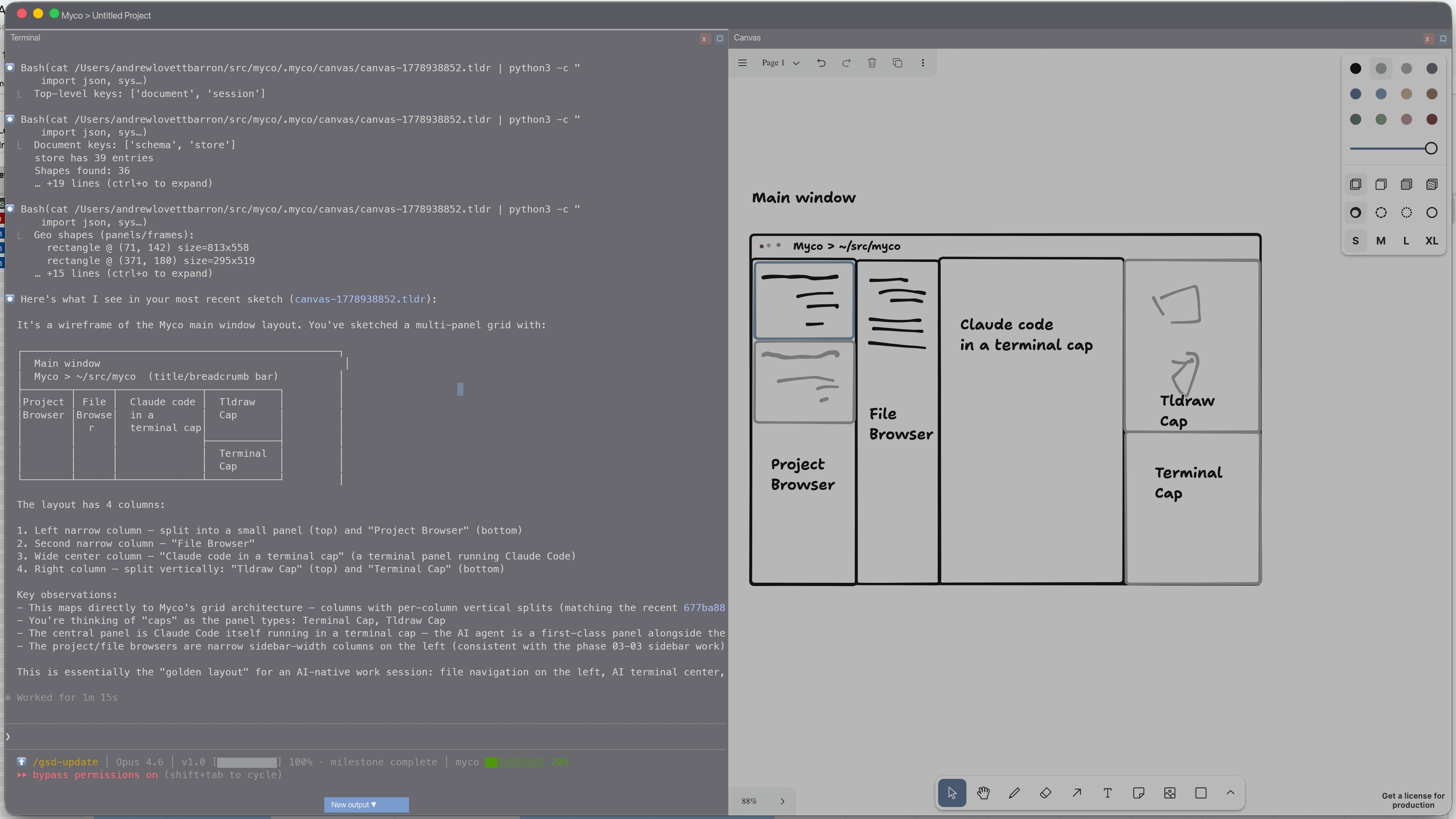
Five panel types ("caps") composable in a CSS Grid layout:
- Terminal cap (GPU-rendered) — Full PTY with alacritty's VTE parser. 24-bit color, Unicode/CJK, scrollback search, mouse selection, clipboard, history, autocomplete. This is where Claude Code runs.
- Canvas cap (native webview) — Excalidraw embedded via wry. Sketches auto-save to
.excalidrawfiles in the project folder. Custommyco://protocol for internal navigation. - Markdown viewer (GPU-rendered) — Live file watching with pulldown-cmark. Updates when the file changes on disk — useful for watching AI-generated planning docs update in real time.
- Agent monitor (GPU-rendered) — Lists running AI processes with CPU/RAM usage, token consumption, and intervention history.
- Heartbeat cap (GPU-rendered) — Periodic LLM-driven project health checks. Jobs defined as JSON in
.myco/heartbeats/, executed against Ollama or Anthropic APIs on a schedule. Results render with severity-colored indicators. Configurable via right sidebar inline editor with Run Now button. - File sidebar — GPU-rendered directory tree with tabbed interface (Files/Search), project search, and close button.
Grid operations: split columns, resize dividers, close panels, fullscreen any cap, column-local vertical splits. Auto-opens last project on launch (configurable).
AI monitoring:
- Per-panel resource dots — CPU/RAM usage tracked per process, threshold-colored dots in panel headers
- Panel freeze/unfreeze — right-click to freeze a runaway process, with a frozen overlay and input blocking
- Intervention detection — scans terminal output for permission prompts and fires toast notifications with focus routing. Two-layer detection: regex pattern matching plus idle-waiting heuristic.
- Stats bar heartbeat indicator — pulsing dot showing heartbeat system status, click to open heartbeat panel
How It Fits Together
Rust throughout, with a hybrid rendering strategy:
- wgpu 29 for terminal text, markdown, sidebar, and UI chrome — direct GPU rendering for performance
- wry (native WKWebView) for Excalidraw canvas — leveraging the web ecosystem where it's stronger
- alacritty_terminal for terminal emulation — battle-tested VTE parser, not a toy implementation
- taffy for CSS Grid layout — the same flexbox/grid engine used by Dioxus and Bevy; N-ary split tree for panel management
- cosmic-text + glyphon for GPU text shaping with font ligatures and BiDi support
- sysinfo for per-process resource monitoring
- git2 for git integration
- objc2 for macOS NSView/first-responder manipulation
Single window, no Electron, no browser overhead. macOS-first with Linux portability planned via wgpu's Vulkan backend.
Iterations and What Emerged
The monolith problem: app.rs grew to 2,750+ lines as caps were added — terminal, canvas, markdown, sidebar all wired directly into the application handler. This is the predictable failure mode of AI-generated code: it accretes correctly but doesn't self-organize. Extracting capabilities into separate modules (terminal/, canvas/, markdown/, sidebar/) was a manual architecture pass after the functionality worked.
Webview focus wars: Getting keyboard events to route correctly between GPU-rendered panels and native webviews took multiple iterations. On macOS, WKWebView captures focus at the NSView level — keyboard events would disappear into the canvas and never return to the terminal. The fix required raw objc2 bindings to manipulate NSView first-responder state, which isn't documented in any Rust crate.
The idle CPU discovery: Initial render loop ran at 100% CPU continuously. Event-driven rendering (only redraw on input/resize/file-change) dropped it to ~25%. A predictable optimization, but one that only surfaced after running the app for real work sessions.
Column-local splits: The original grid model split the entire window. After using the app, splitting only the focused column felt obviously right — you want to add a panel next to what you're working on, not reorganize the whole layout.
Intervention detection as the killer feature: The intervention scanner — detecting when Claude Code is waiting for a permission prompt — turned out to be the feature that actually changes the workflow. Without it, you alt-tab back to check on the agent periodically. With it, a toast fires and focus routes to the right panel.
Heartbeat cap and the right sidebar: Phase 10 added a new cap type — periodic LLM health checks — and with it came a right sidebar for job configuration. The inline editor for heartbeat jobs (toggle, edit prompt, set schedule) was the first non-panel UI surface in the app, requiring a second sidebar framework alongside the file browser. Ollama auto-detection means the heartbeat system works out of the box if you have a local model running.
UX audit revealed 20+ dead ends: A systematic audit (Phase 15 research) cataloged features that exist in code but aren't wired to UI — freeze/unfreeze parsed but not connected, project switcher rendered but not displayed, search scroll disabled, history click stubbed out. This is the cost of shipping features faster than UX integration can follow, and it shaped the Phase 15 UX Polish plan.
Warp feature audit shaped the roadmap: Analyzing Warp's terminal UX patterns identified high-impact adaptations that would be Myco-specific: terminal block model (blocks as AI-readable history), file-based workflows (local-first vs cloud), and runnable markdown (locally executable notebooks). This directly produced the Phase 11-14 plan.
Key Design Decisions
- Folder-first, not session-first — All state lives in the project folder (
.myco/canvas/,.myco/heartbeats/,.myco/workflows/). Close the app, reopen it, everything is there. No database, no cloud sync, no session tokens. - GPU rendering for text-heavy panels — Terminal and markdown don't go through a browser engine. Per-row buffer caching means only changed rows re-shape glyphs.
- AGPL-3.0 license — Deliberate choice: if someone builds a hosted version, they must share the source. Desktop use is unrestricted.
- LLM for monitoring, not agency — The heartbeat cap calls Ollama/Anthropic APIs for periodic health checks, but Myco doesn't try to be an agent. AI coding agents run in terminal caps. The LLM integration is observational — "is this project healthy?" — not generative.
- macOS-first — WKWebView APIs, Metal GPU backend, NSView manipulation. Linux support is architecturally possible (WebKitGTK + Vulkan) but not yet tested.
What's Next (Phases 11-15)
- Phase 11: Terminal block model — Group command+output into navigable blocks with metadata (.myco/history.json), OSC 133 shell hook parsing
- Phase 12: Command palette — Cmd+P fuzzy search over actions, workflows, recent commands, files
- Phase 13: File-based workflows — Parameterized commands in .myco/workflows/*.json with argument UI
- Phase 14: Runnable markdown — "Run" buttons on fenced code blocks in markdown panels
- Phase 15: UX polish — Expose all hidden backend configuration to users (LLM settings, heartbeat job creation, font settings, clickable links, layout persistence)
Open Questions
- Layout persistence isn't built. Auto-open-last-project works, but full layout restore (which panels, where, what size) isn't done. Every session starts with the right project but the wrong arrangement.
- No user validation. Built for my own workflow. Whether other AI-agent users want a dedicated workspace vs. just using their existing terminal + editor is an open question.
- Heartbeat quality depends on prompt and model. The infrastructure works, but LLM response quality varies — severity parsing is brittle when models don't follow the tag format.
- 20+ dead ends in the codebase. Features shipped faster than UX integration — Phase 15 is the planned cleanup.
Ecosystem Role
Myco is the workspace where other portfolio projects get built — Claude Code runs in a terminal cap, planning docs render in the markdown viewer, architecture sketches live in Excalidraw canvases. It's also the only project in the portfolio written in Rust for the primary application (Wallflower and Takoyaki use Rust via Tauri, but their UI is React).